

NDA Client - Solar & Clean-Tech Manufacturer

A messy HubSpot account and a noisy Salesforce sync, rebuilt into one clean lead-to-installation pipeline

Solar Client
HubSpot + Salesforce,
Australia
Client
Solar Energy Company (NDA client)
Year
2026
Services
Integration
Industry
Solar
This client is an Australian clean-tech manufacturer of smart solar inverters and battery storage systems, selling to residential homeowners and through a network of certified installers and energy retailers. Before engaging T&H Digital, their HubSpot account had become a junk drawer of duplicate, conflicting properties, was regularly billed over its contact tier limit, and fed an existing Salesforce integration that created duplicate lead records instead of clean attribution.
T&H Digital audited and consolidated the HubSpot data, then rebuilt the Salesforce integration so leads, lifecycle stages, and deal status sync automatically in both directions.The result: the sales team now works from one accurate lead record instead of duplicates, and the client can trace a marketing campaign through to an actual hardware installation for the first time.

COMPANY
NDA Client - Solar & Clean-Tech Manufacturer

INDUSTRY
Solar / clean-tech hardware manufacturing

LOCATION
Australia

Challenge
HubSpot had become an unmanaged, duplicate-riddled system that was regularly over its contact tier, feeding a Salesforce integration that created duplicate leads instead of clean attribution

Solution
A full HubSpot audit and data consolidation, followed by a properly configured bi-directional HubSpot-Salesforce integration, now supported through an ongoing retainer

SERVICES DELIVERED
HubSpot Audit, Data Architecture & Consolidation, Marketing Contacts Management, Workflow Streamlining, Salesforce Integration, Ongoing Retainer

Tech Stack
HubSpot Marketing Hub, Salesforce

$0+
saved/year
Avoided HubSpot contact tier overage penalties once marketing contact criteria were enforced automatically.
0+
workflows audited, consolidated into one streamlined set
Every active workflow reviewed and rebuilt, removing ones that overlapped or fired on conflicting triggers.
0
duplicate leads reaching the sales team
The rebuilt Salesforce sync replaced a feed that was creating duplicate records with one clean, accurate lead handoff.
The Challenge
Why was HubSpot creating more problems than it solved for this manufacturer?
The account had become a junk drawer. Years of ad hoc property creation meant the same piece of information was tracked in three or four different fields at once, and nobody could say with confidence which one was accurate. The client was also regularly over its HubSpot contact tier, historically somewhere in the 10-25% range, without a clear rule for who should count as a marketing contact and who shouldn't.
Duplicate fields, no single source of truth

A lead's status might live in a field called "Lead Status," a second called "Status," and a third called "Lead_Status_Internal," each updated by a different person for a different purpose. A report pulled from one field told a different story to a report pulled from another.


Paying a penalty for contacts nobody was using

Every month over the contact tier limit meant an avoidable billing penalty, and no one had built the workflows needed to keep the list clean on an ongoing basis.


A Salesforce sync that created duplicates instead of clarity

Salesforce was the client's system of record for sales, installer partnerships, and hardware serial numbers. The existing HubSpot integration was meant to hand off qualified leads cleanly, but instead pushed duplicate and low-quality records into Salesforce, cluttering the sales team's view of who was actually a real prospect.

No one internally had the HubSpot skills to fix it

The marketing team knew HubSpot was underperforming but didn't have the in-house specialism to diagnose a data structure this tangled, and needed a partner who could act as their marketing operations function rather than an outside consultant parachuting in for a single project.

The result: a marketing team that couldn't trust its own data, a sales team that didn't trust the leads it was receiving, and a monthly bill padded with contacts that should never have counted.

The Solution: How did T&H Digital properly configure the HubSpot and Salesforce integrations?

T&H Digital ran a two-month clean-up across the full HubSpot instance, then reconfigured the HubSpot-Salesforce integration using HubSpot's pre-built marketplace integration rather than building from scratch. The team then moved into an ongoing monthly retainer, effectively becoming the client's marketing operations function.

A full audit before touching anything
Every property, workflow, list, and report across contacts, deals, and companies was reviewed before a single change was made, so fixes addressed the real cause of the duplication instead of the symptoms.

One field per data point
Conflicting properties were consolidated into a single source of truth for each data point, with workflows and permissions rebuilt to stop the fragmentation from creeping back in. Marketing and sales now read from the same fields.

Contact tier rules that enforce themselves
Clear, workflow-enforced criteria now define what counts as a marketing contact, so the account stays within its tier automatically instead of relying on someone remembering to clean the list each quarter.

A bi-directional HubSpot-Salesforce sync built for lead attribution
HubSpot now pushes new leads, lifecycle stage changes, and lead source data to Salesforce as they happen. Salesforce pushes deal and customer status back to HubSpot, including the moment a deal moves from Lead to Closed Won. That gives the client one continuous record of a contact's journey from first marketing touch to installed hardware.
  • Same data point tracked in 3-4 conflicting properties

  • Marketing contact list managed manually, often over tier

  • HubSpot to Salesforce sync created duplicate leads

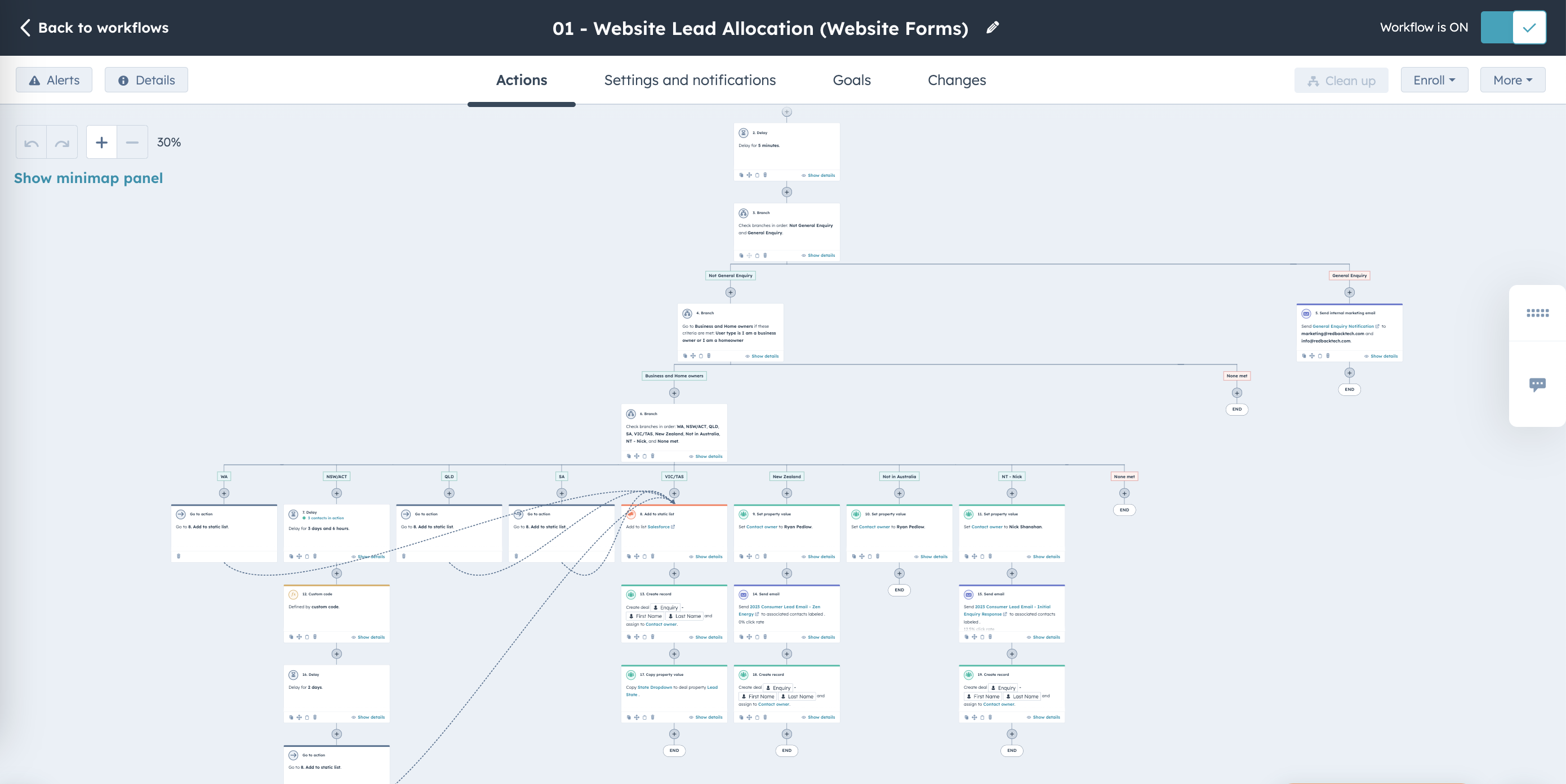
  • 30-50 overlapping, conflicting workflows

  • No internal HubSpot specialism

  • One property per data point, enforced by workflow

  • Criteria-based workflows keep the account within tier automatically

  • Bi-directional sync with clean lead source, lifecycle stage, and deal status

  • Consolidated into a smaller, higher-efficiency set

  • T&H Digital embedded as ongoing marketing operations partner

Before
After

Same data point tracked in 3-4 conflicting properties
One property per data point, enforced by workflow

Marketing contact list managed manually, often over tier
Criteria-based workflows keep the account within tier automatically

HubSpot to Salesforce sync created duplicate leads
Bi-directional sync with clean lead source, lifecycle stage, and deal status

30-50 overlapping, conflicting workflows
Consolidated into a smaller, higher-efficiency set

No internal HubSpot specialism
T&H Digital embedded as ongoing marketing operations partner

With clean data and a working integration in place, the client now has the foundation to layer in more advanced lead scoring and installer-partner reporting over the next 12 to 24 months, without redoing the underlying plumbing first.
Product_Logo_Centered_Marketing_Hub
Workflow
The Results
Why was HubSpot creating more problems than it solved for this manufacturer?
Marketing can see which campaigns lead to an actual hardware installation, not just a form fill, because lifecycle stage and deal status now flow automatically between systems.
Criteria-based workflows keep the account within tier automatically
The account stays within its HubSpot contact tier without anyone manually pruning the list each month.
A tangle of overlapping workflows is now a smaller set the team can actually reason about and maintain.
The single biggest change: lead attribution that used to take guesswork now happens automatically, giving the client a clear line of sight from marketing campaign to installed hardware.

Who This Solution Works For

This kind of engagement fits businesses that already have HubSpot and Salesforce running, but don't have the in-house skills to keep the data clean or the integration reliable.

Good Fit
Manufacturers or hardware businesses selling through both direct and partner/installer channels
Teams where Salesforce and HubSpot are both live but not talking to each other properly
Businesses regularly billed for HubSpot contact tier overages
Marketing teams without a dedicated HubSpot specialist on staff
Needs something else first
Businesses not yet using Salesforce or HubSpot at all — better suited to a build from scratch
Teams without a Salesforce admin who can approve changes on their side
Accounts small enough that a full integration isn't yet worth the investment
If any of the "good fit" column sounds familiar, that's usually the point where a clean-up and integration project pays for itself.

FAQs

How do I fix a broken HubSpot account?

Start with a full audit of properties, workflows, lists, and reports before changing anything, so you're fixing the actual cause of the mess rather than the symptoms. From there, consolidate duplicate properties into a single source of truth and rebuild workflows to stop the problem recurring.

What does a HubSpot audit cover?

A proper audit reviews every active property, workflow, list, and report across contacts, deals, and companies, and checks how the account is actually being used against how it's meant to be used. It should surface duplicate or conflicting fields, redundant workflows, and anywhere the contact tier is being pushed over its limit.

How long does it take to rebuild a messy HubSpot CRM?

A typical clean-up runs around two months for the initial audit and rebuild, followed by an ongoing retainer to keep the account optimised. The exact timeline depends on how many properties, workflows, and integrations need to be untangled.

Can T&H Digital work with an existing HubSpot setup?

Yes. Most engagements start with an existing, already-live HubSpot account rather than a blank slate. We audit what's there first and build the fix around the account's real history and data, rather than starting over.

How long does a HubSpot to Salesforce integration take to build?

It depends on how much of the underlying data needs cleaning up first. A straightforward bi-directional sync can be built in a matter of weeks, but if the HubSpot side has duplicate or conflicting properties, that clean-up work usually needs to happen before the integration is worth building.

What data typically syncs between HubSpot and Salesforce?

Most commonly: contact details, lead source, lifecycle stage, and deal or customer status, in both directions. HubSpot pushes new leads and marketing engagement to Salesforce, and Salesforce pushes back deal outcomes like a deal moving from Lead to Closed Won, so both systems reflect the same customer journey.

Is your HubSpot account quietly costing you in overage fees and bad data?

T&H Digital
  • HubSpot Platinum Solutions Partner
  • Custom Integration Accredited
  • 2023 HubSpot Impact Award - Custom Integration
If your HubSpot setup isn’t delivering the results you expected, we should talk.
T&H Digital — We connect the systems that connect your business.
HubSpot Audit · Data Architecture · Salesforce Integration · Ongoing Retainer
Last updated: July 2026